Pages

Subscribe:
Showing posts with label regedit. Show all posts

June 09, 2009

How to remove the System Tray?

Windows Vista and previous versions of Windows have a system tray which allows you to access programs with ease. The tray is placed at the bottom right of the screen. If you want to remove or hide it for some reason, you cannot eliminate or hide it using any normal Windows function. But, here is how, you can do it with a simple registry hack.

Click ‘Start’ and type ‘regedit’.
Go to ‘HKEY_CURRENT_USER|Software|Microsoft|Windows|Current Version|Policies|Explorer’.
Right-click on the left pane and ‘New|DWORD (32-bit) Value’.
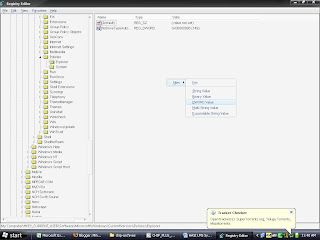

Type ‘NoTrayItemsDisplay’, double-click it and enter the value ‘1’.
Close the registry editor and reboot.

Ref: Chip

How to remove shortcut arrows in Vista?

Windows Vista Ultimate has an amazing graphical interface like you’ve never seen before. Wonder why?An arrow appears on every shortcut that is placed on the desktop or anywhere on the computer. But this can be very annoying and you may want to remove them some point of time. But you feel it difficult? All you need to do is edit the registry.Follow the steps listed below to do so. But do this carefully and if you want, take a back up before:
  1. Click ‘Start’ and type ‘regedit’
  2. Expand on folder named the ‘HKEY_CLASSES_ROOT’.
  3. Click the ‘Inkfi le’ folder.Type ‘AriochIsShortcut’ instead of ‘IsShortcut’
  4. Once close regedit and reboot.
  5. The arrows no longer appear on the shortcut icons.To reverse the process, replace ‘IsShortcut’ with ‘AriochIsShortcut’ and reboot the system.
Ref: Chip